forbuilders.in · contact@forbuilders.in
Home Features Every feature. All live today.Thirteen parts of one app, from the first site entry to the final client bill. Each one links to a page with the details.
Money and projects
See every site and every rupee.
Projects & dashboard
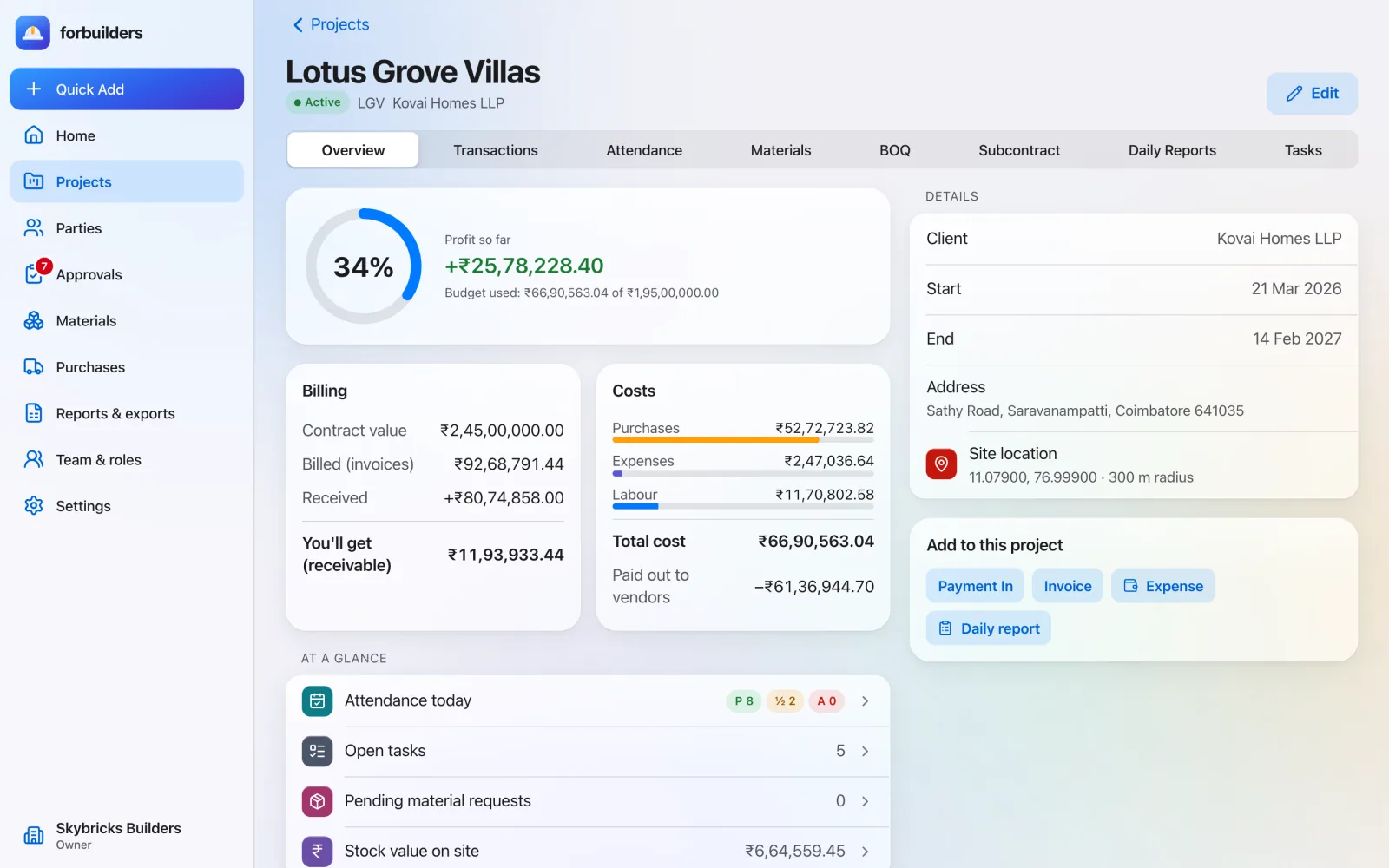
Every site, at a glance. Each project gets its own budget, progress and profit view. The dashboard shows what happened across your sites today, without a single phone call.
Project overview: Contract value, billed, received, still to come, total cost and budget used.
Profit so far: Billed minus purchases, expenses and labour. It shows “Loss so far” when the number is negative.
At a glance: Attendance today, open tasks, pending material requests and stock value on site.
Projects & dashboard in detail app.forbuilders.in
Project overview with billing, costs and profit so far Money ledger & GST
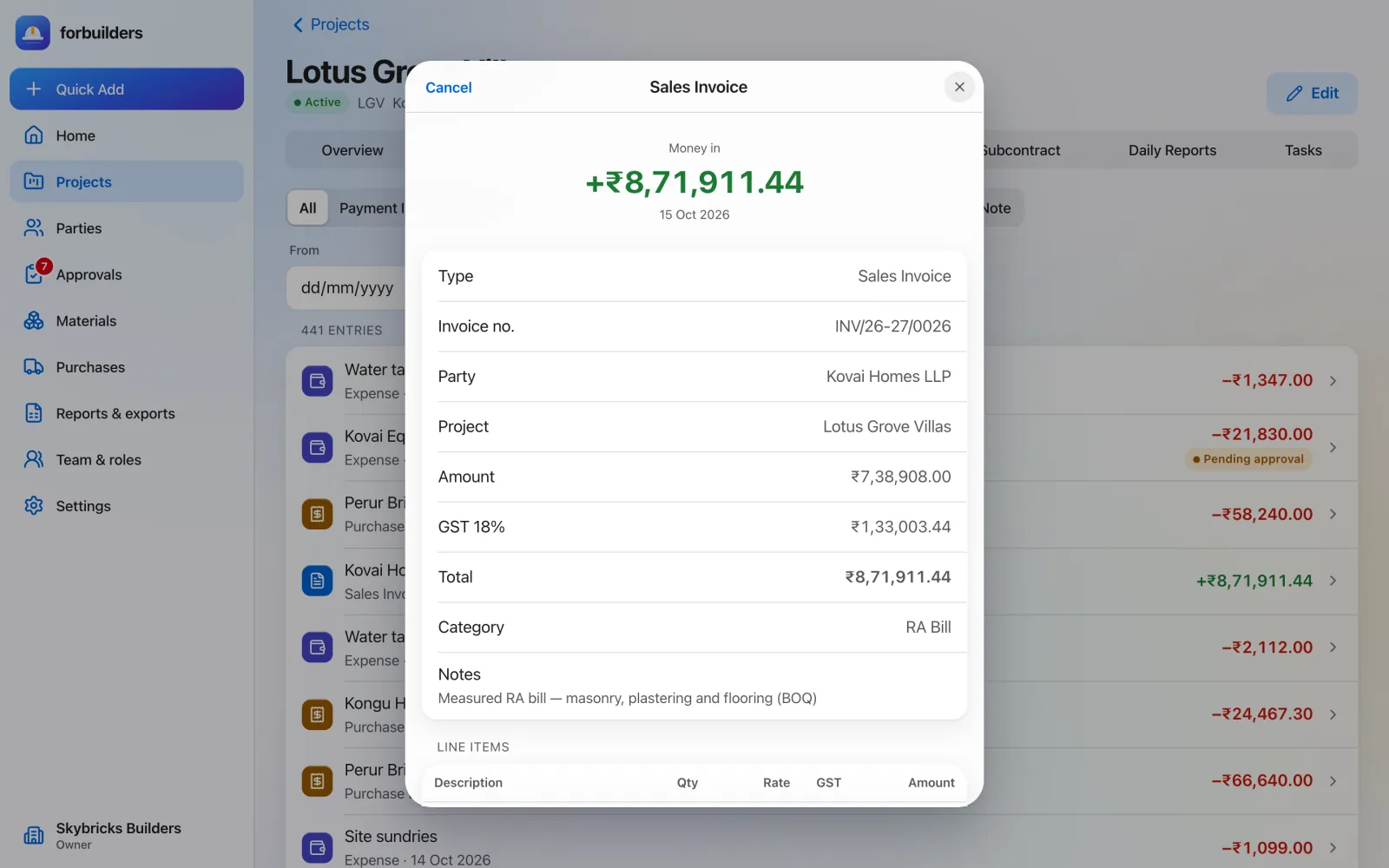
Know where every rupee went. Payments, expenses, sales invoices and purchase bills, recorded against the right project and party. The GST split is worked out for you.
Every kind of entry: Payment in, payment out, sales invoice, purchase bill, expense, debit note and credit note.
GST split for you: Same state: CGST and SGST, half each. Different states: IGST. The state comes from the GSTIN.
Party ledgers: Clients, vendors, subcontractors, workers and staff, each with a running balance.
Money ledger & GST in detail app.forbuilders.in
A sales invoice (RA bill) in the money ledger, with GST Reports
Month end, already done. Ten ready-made reports, on screen and as Excel or PDF, for this month, last month, this or last financial year, or any dates you pick.
Project P&L: Billed against purchases, expenses and labour.
Party ledger and cash book: Running balances and every rupee in and out.
Expenses by category: Fuel, food, rent, machinery, transport and more.
Reports in detail Also included
Attendance & wages and stock Days, overtime, wages paid and due; stock and value per site.
GST summary For Owners and Finance only.
BOQ progress, PO register, work orders For client meetings and vendor follow-up.
On site
Fast entries, even with no signal.
Labour attendance & wages
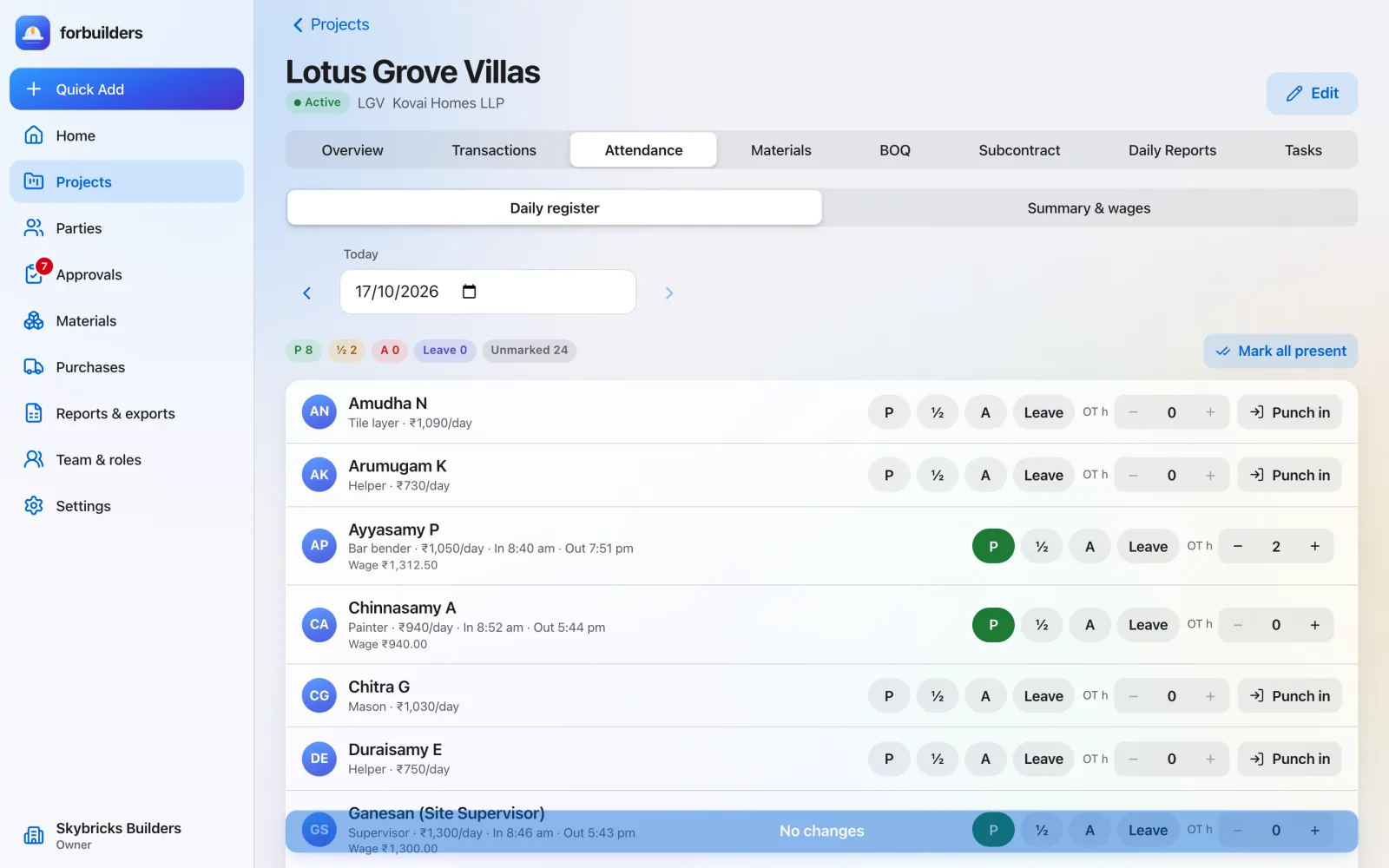
Attendance in seconds. Wages without the maths. Mark the roster on the phone at the site. Punch-in records where and when. Wage totals are ready from attendance you have already marked.
Four day types: Present, half day, absent and paid leave, with overtime hours.
GPS punch-in: Records the position and time in and out. If the site location is set, punches from outside the site radius are refused.
Wages worked out: Daily wage × day, plus overtime at the daily wage ÷ 8 per hour. Fixed at the moment attendance is marked.
Labour attendance & wages in detail app.forbuilders.in
Attendance register with punch-in and overtime Materials & inventory
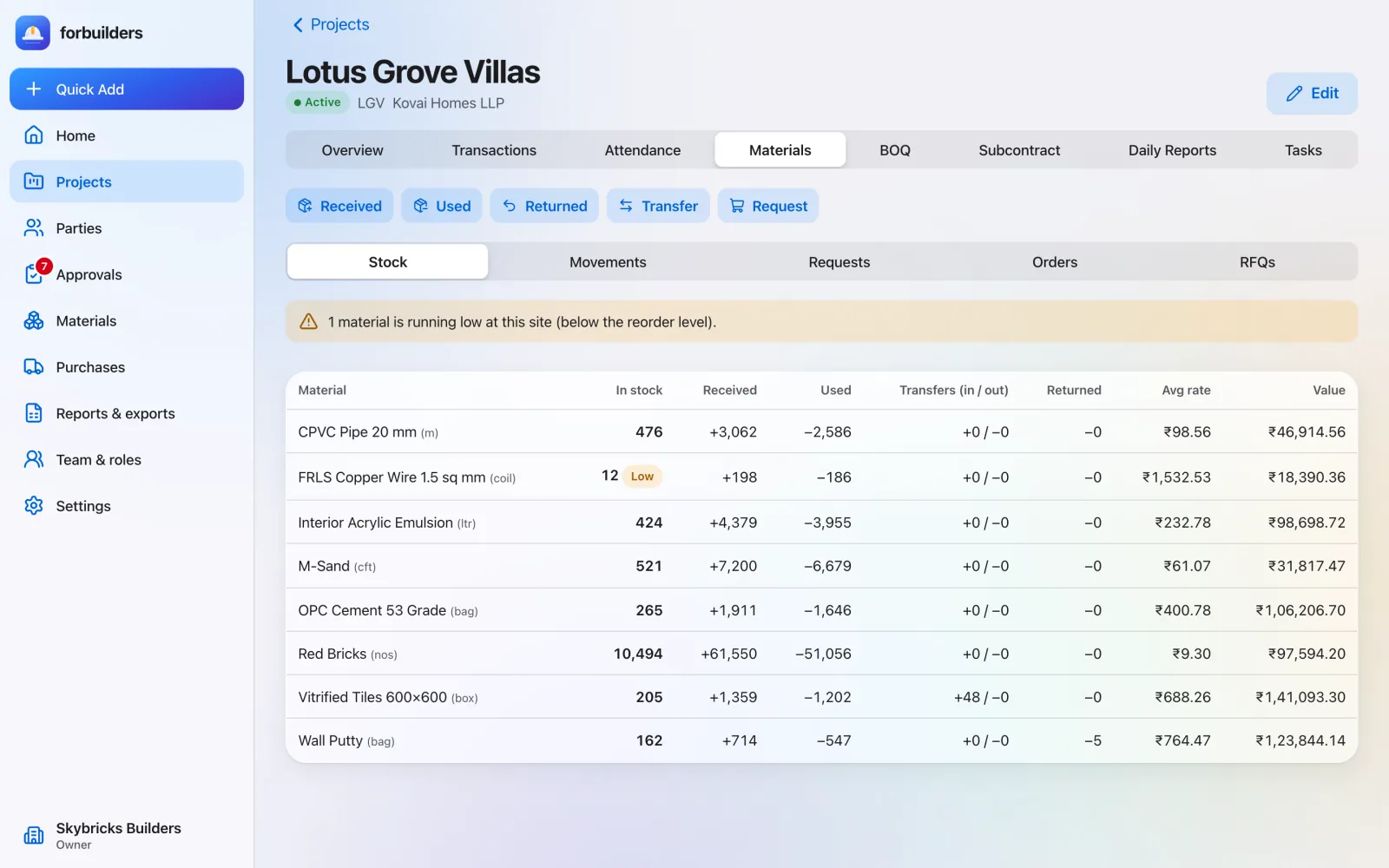
Live stock on every site. Record what arrives, what is used and what moves between sites. Stock is always current, and low stock is flagged before a pour stops.
Every movement: Received, used, returned to vendor and transferred between projects.
No negative stock: You cannot use or return more than is in stock.
Low-stock alerts: Set a reorder level per material. Low and out-of-stock items are flagged.
Materials & inventory in detail app.forbuilders.in
Stock on site with a low-stock alert Daily progress & tasks
Today’s site, in one report. One daily report per project, written on the phone at the site, with photos. Tasks keep everyone clear on what is due.
One report a day: Work done, manpower, weather, issues and photos, per project per day.
Linked to BOQ: BOQ progress recorded that day can be linked to the report.
Saves offline: Reports and photos save on the phone and sync when the signal returns.
Daily progress & tasks in detail Also included
Tasks with due dates Title, details, assignee, start and due dates, progress and status.
Clear status To do, in progress, blocked or done. 100% progress and Done stay in step.
Right access Site In-charge members update task progress and status; leads and owners plan the work.
Works offline
Even where the signal doesn’t. Basements, new layouts and remote sites often have no signal. The everyday site entries save on the phone and sync on their own when the connection returns.
What works offline: Attendance, expenses with receipt photos, daily reports and photos, material used and received, BOQ progress, and tasks.
Never twice: Each entry carries a unique key, so a retry never records it twice.
Syncs by itself: When the connection returns, when the app opens, and every 30 seconds.
Works offline in detail Also included
Clear problems If an entry cannot be saved, it shows “Needs attention” so you can fix or discard it.
Lists stay available Projects, workers and materials load from the phone, up to seven days old.
Install like an app Add forbuilders to the home screen from the browser. No app store download.
Buying and billing
From quote to client bill.
Purchasing: RFQ to GRN
Buy right. Receive right. Request quotes, compare them side by side, award the order and record what actually arrived. Stock and bills follow automatically.
Quote comparison: Every vendor’s rate per item, with the lowest marked.
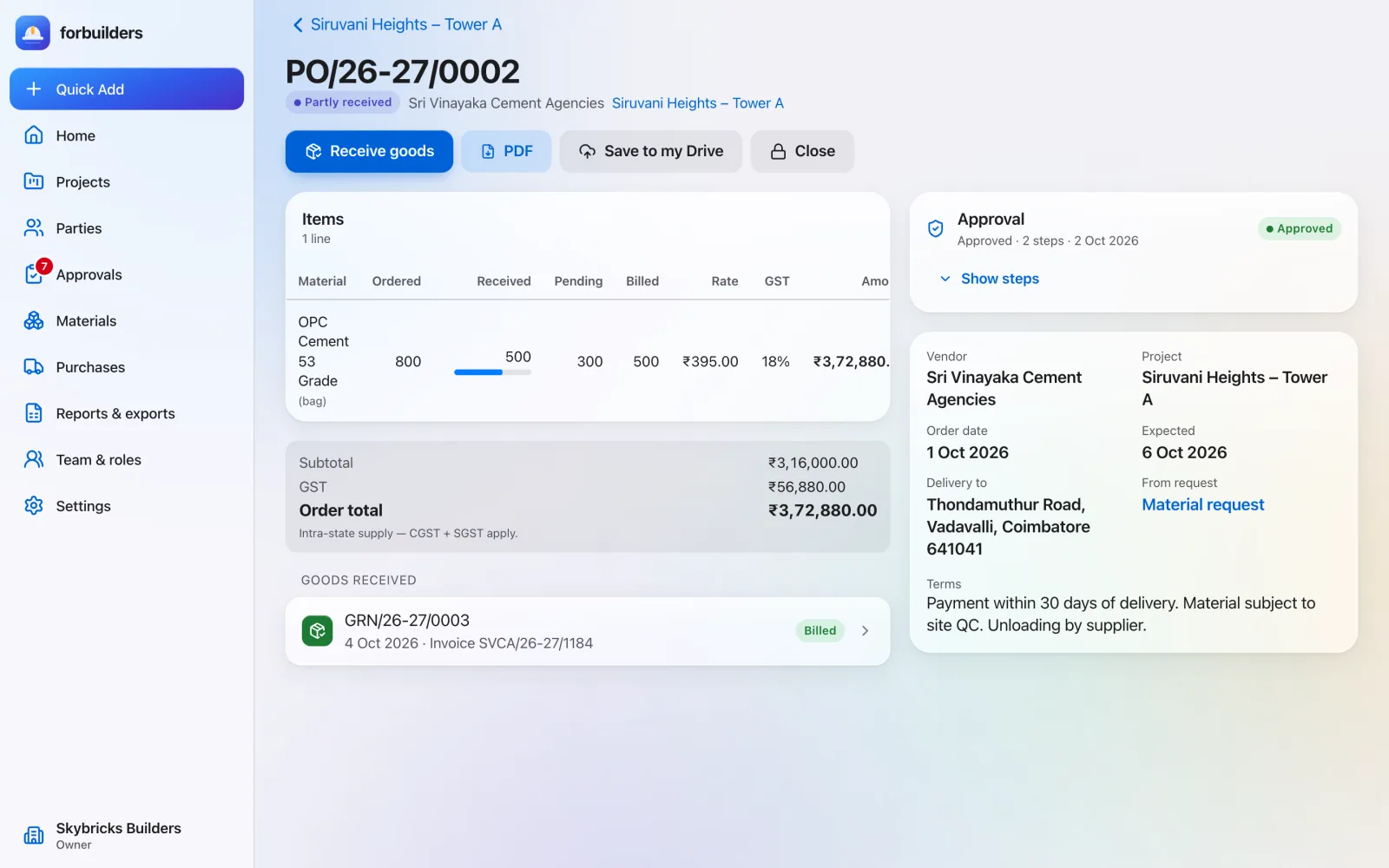
Purchase orders with PDF: Draft, approval, approved, partly received, received, closed or cancelled.
Part deliveries: Record each GRN as it comes, with rejected quantity, vendor invoice number and vehicle number.
Purchasing: RFQ to GRN in detail app.forbuilders.in
Purchase order, part delivery and goods received Subcontractors
Agreed rates. Clean bills. Work orders with agreed rates, bills that cannot exceed what was ordered, and retention and TDS worked out on every bill.
Work order PDF: Lines with unit, quantity and rate, optionally linked to BOQ items.
Retention: Set from 0 to 20% per work order and held on every bill.
TDS: Set from 0 to 10% per work order and deducted on every bill.
Subcontractors in detail Also included
No over-billing A bill cannot exceed the work-order quantity.
Advances Pay or give an advance directly from the work order.
One summary Value, GST, billed, retention held, TDS deducted, paid and outstanding.
BOQ & RA bills
From measured work to client bill. Keep the BOQ in the app, record the work done against it, and raise the next running-account bill from what is executed but not yet billed.
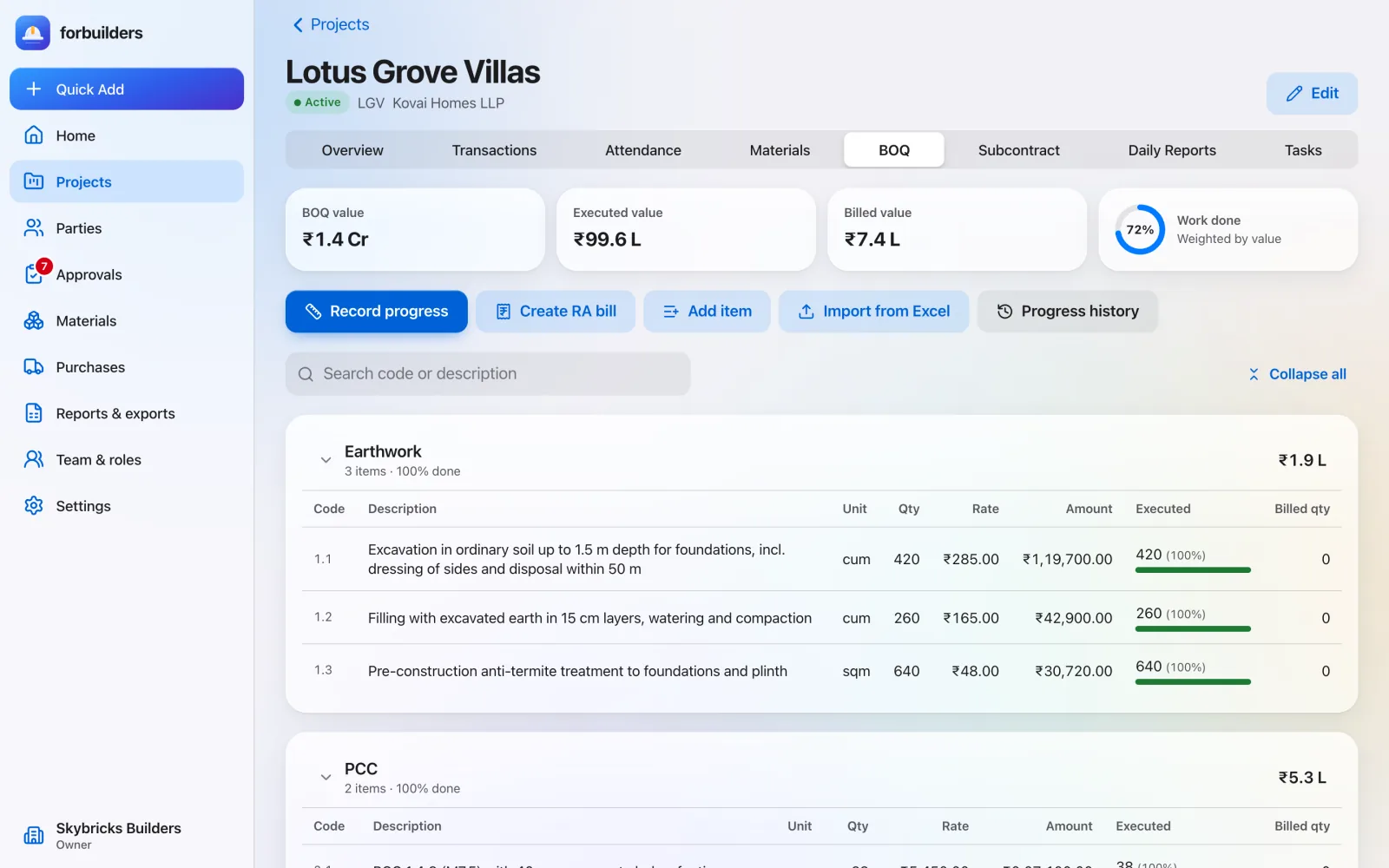
Full BOQ items: Code, section, description, unit, quantity, rate, cost rate, GST % and HSN/SAC.
Safe import: If any row is wrong, nothing is imported and each row’s error is shown.
Progress you can trust: Executed quantity cannot exceed the BOQ quantity. Progress % is weighted by value.
BOQ & RA bills in detail app.forbuilders.in
BOQ progress and running-account billing Approvals
Nothing goes out without the right yes. Set rules for what needs approval and who gives it. forbuilders routes each entry, keeps the record and stops anyone approving their own work.
What can need approval: Purchase orders, work orders, subcontractor bills, payments out, expenses and material requests.
Up to five levels: Each level is a role (Owner, Project Lead, Finance) or a named person.
No self-approval: Whoever created, submitted or materially changed an entry cannot approve it.
Approvals in detail Also included
Edits go back Editing an approved entry sends it back for approval.
Owner override, recorded An Owner can act at any level; it is recorded as an override and alerted.
No gaps If rules exist but none covers a project, larger amounts still get an Owner approval step.
Team and data
The right access, and your data safe.
Team, roles & sign-in
Everyone sees what they should. Five roles decide what each person can see and do. Invitations go by email, people set their own passwords, and every new device is confirmed with a code.
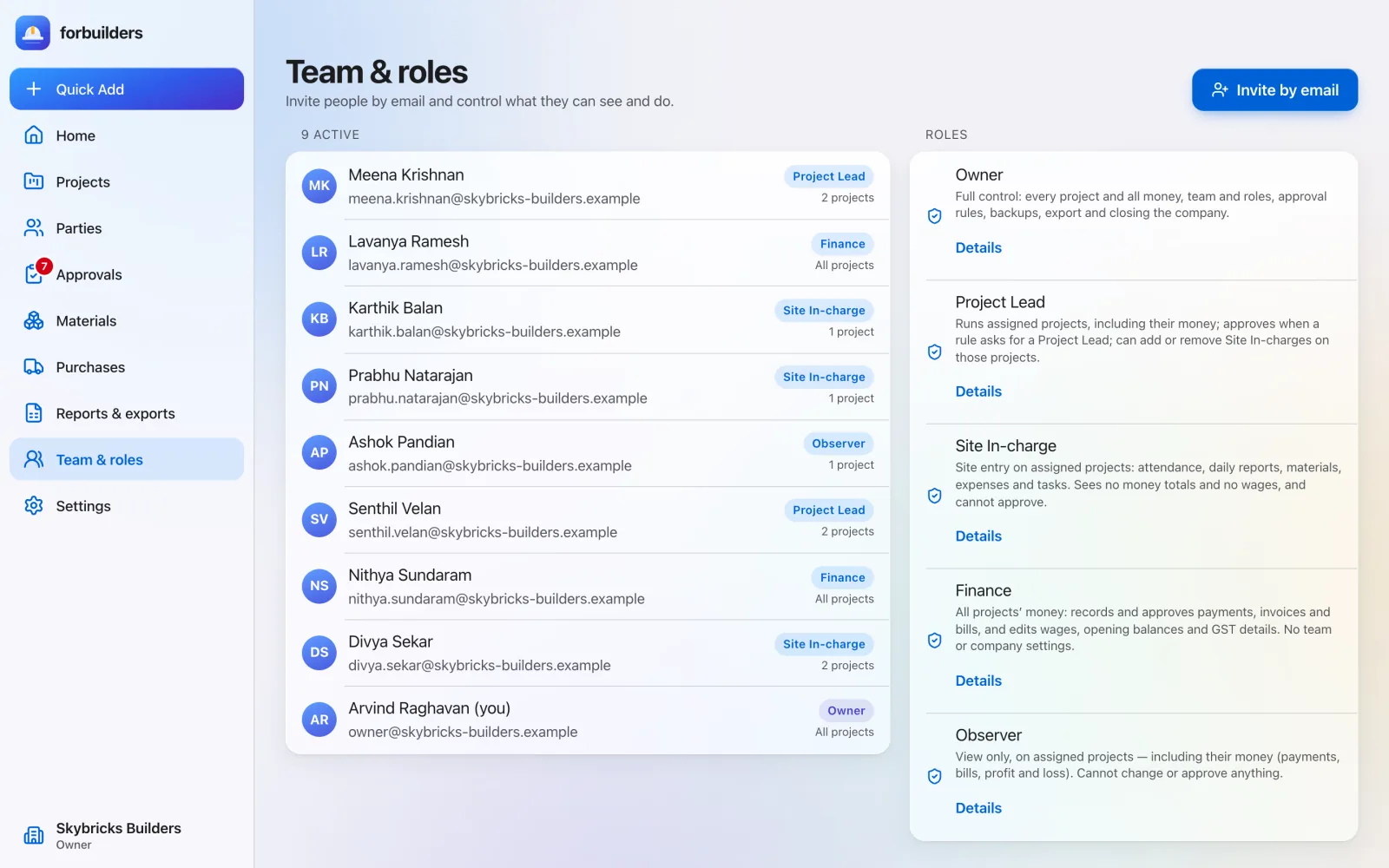
Owner: Everything, including company settings, team, approval rules, backups and export.
Project Lead: Runs assigned projects: money, attendance, stock, reports, tasks and approvals.
Site In-charge: Site entries on assigned projects. No money totals, no wages.
Team, roles & sign-in in detail app.forbuilders.in
Team members, roles and invitations Drive backup & your data
Your data stays yours. A daily backup to the owner’s own Google Drive, a full export whenever you want it, and data stored in India.
Your own Drive: Backups go to a forbuilders folder in the Owner’s Google Drive, under your company’s control.
Limited access: forbuilders uses Drive’s file-only permission: it sees only files it created or that you picked.
You choose what: Pick the record types. Worker personal details and the audit log are off unless you turn them on.
Drive backup & your data in detail Also included
Keep 7 to 90 days Choose how many daily backups to keep. The default is 30.
Full export Owners can download a complete export of the company’s data at any time.
Stored in India The app runs on Microsoft Azure in Central India.
Try every feature, free during early access. Free during early access. Sign up with Google or email, add a project and invite your team in about five minutes.